လုပ်ဆောင်ချိန် ကြည့်ရှုပါ
ရှင်းလင်းမှုအတွက် တည်ဆောက်ထားပြီး ရှုပ်ထွေးမှု မရှိ။
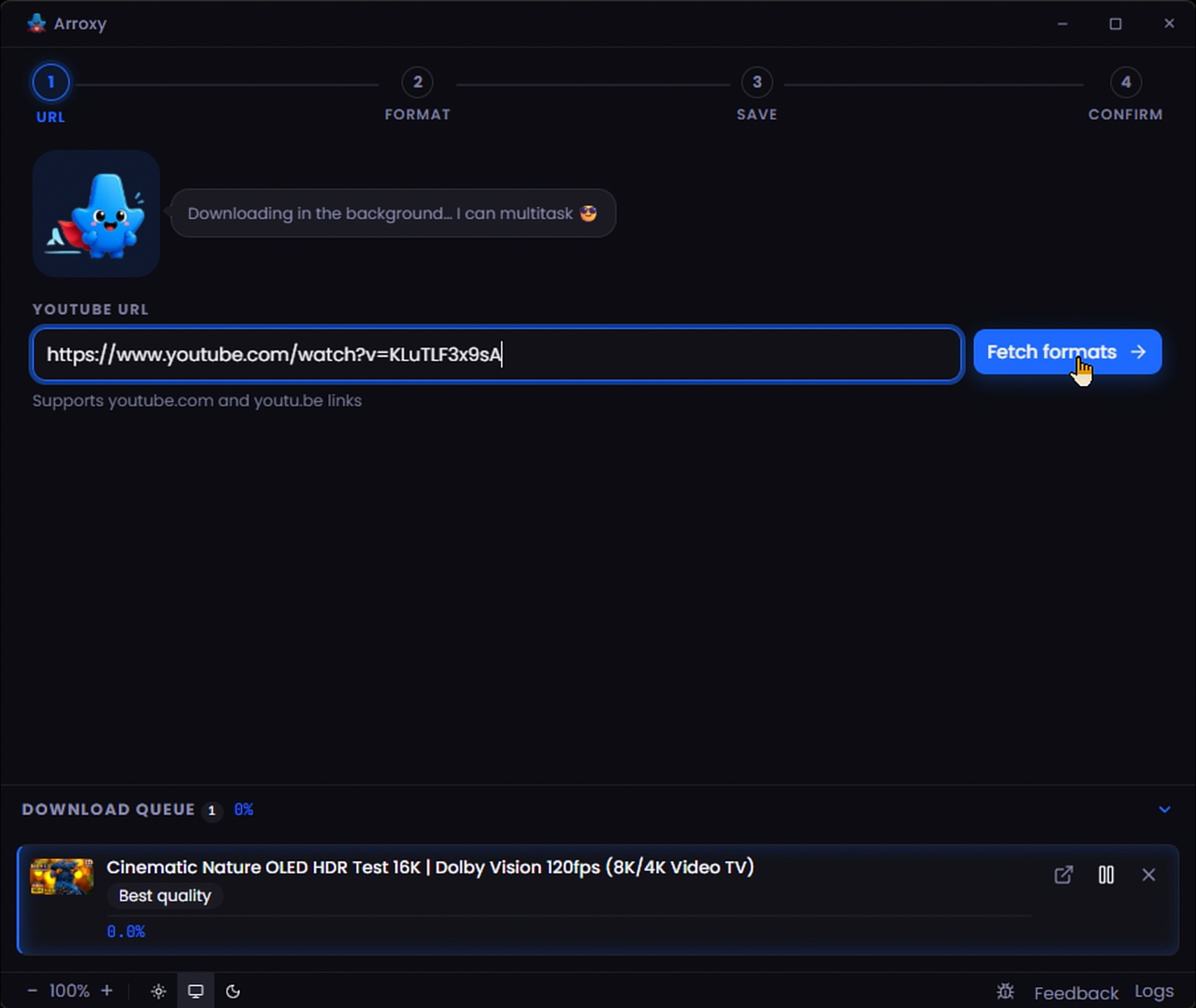
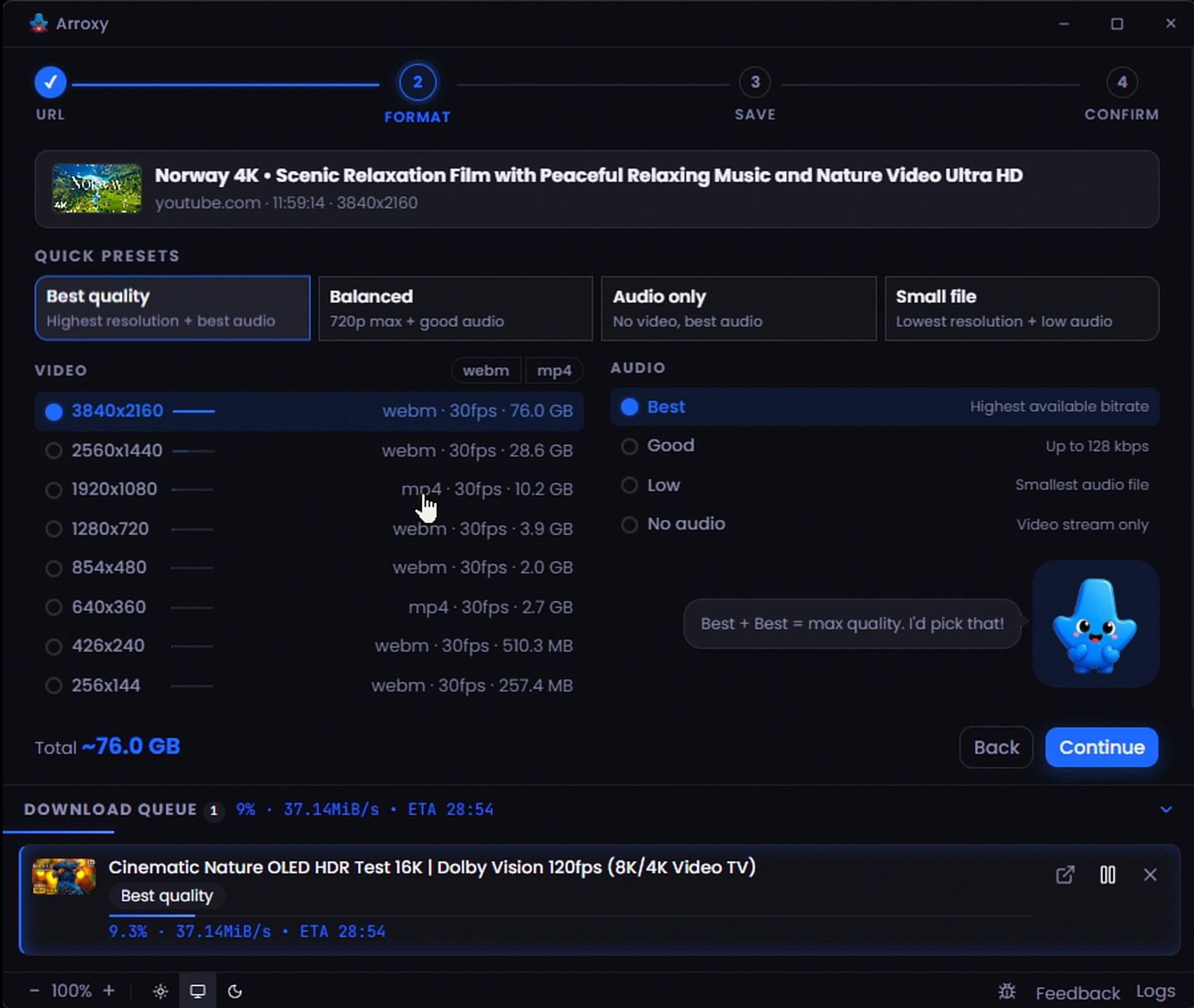
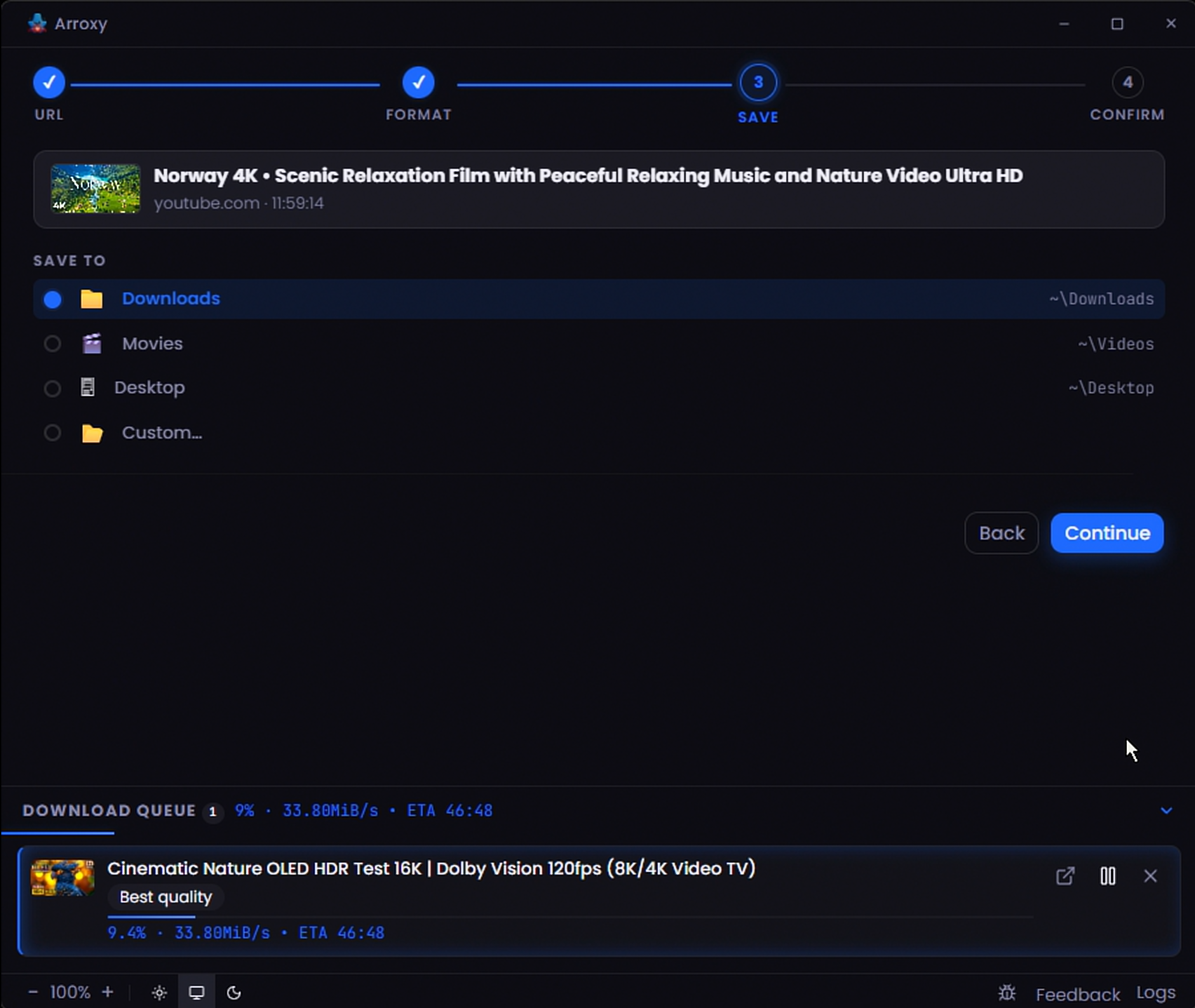
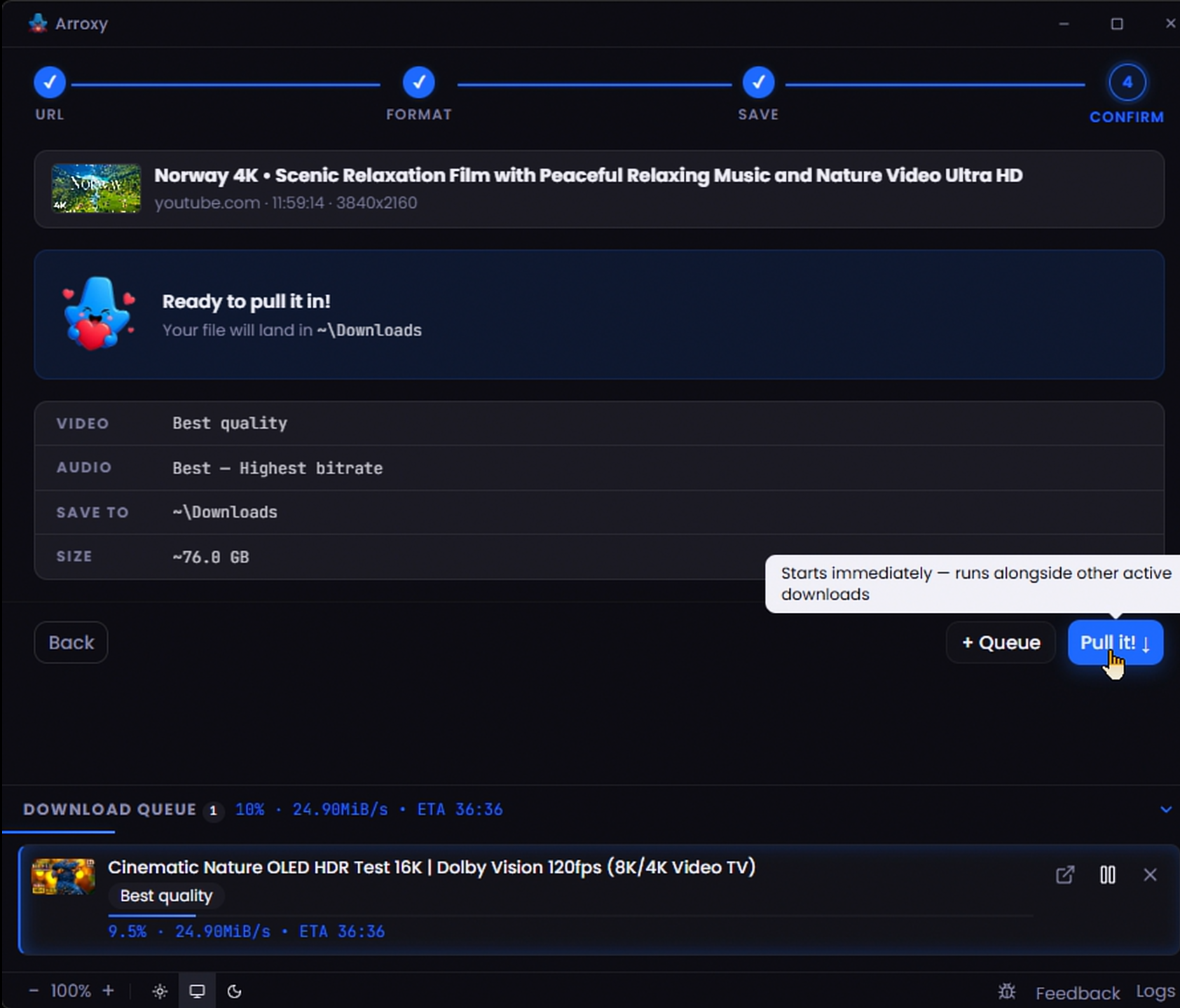
Arroxy သည် Windows, macOS နှင့် Linux အတွက် အခမဲ့၊ MIT လိုင်စင်ပါ desktop YouTube ဒေါင်းလုဒ်ဆော့ဖ်ဝဲဖြစ်သည် — 4K Video Downloader ၏ လော့ဂ်အင်မလိုသော အစားထိုး။ yt-dlp ထောက်ပံ့သည့် ဆိုက် 2000+ တွင် အလုပ်လုပ်ပြီး 60 fps ဖြင့် 4K HDR အထိ ဒေါင်းလုဒ်လုပ်သည်။ ကြော်ငြာမရှိ၊ watermark မရှိ၊ အသုံးပြုမှု ကန့်သတ်ချက်မရှိ။ URL ကူးထည့်ပြီး စတင်ပါ။
နောက်ဆုံး ထုတ်ပြန်မှု: v0.3.6 · Windows · macOS · Linux
၂၀၂၆ မေလ snapshot။ ရင်းမြစ်များ: yt-dlp supportedsites.md, openpanel.dev launch events။
Same flow on Windows, macOS, and Linux — paste a URL, pick a quality, save the file. No account, no setup, no extra tools.
Click Download above and Arroxy picks the right build for your OS — .exe installer or portable on Windows, .dmg (Apple Silicon or Intel) on macOS, .AppImage or .flatpak on Linux. The button also works on the GitHub Releases page directly.
First-launch warnings are normal for unsigned indie open-source builds. Windows: click More info → Run anyway. macOS: open System Settings → Privacy & Security → Open Anyway. Linux: mark the AppImage executable (chmod +x or your file manager's Properties → Permissions). Full verification steps below.
Copy any YouTube link (or one of 2000+ supported sites), paste it into Arroxy, pick a resolution (4K, 1080p, audio-only MP3, etc.), choose a save folder, and click Download. Playlists, subtitles, and SponsorBlock cuts work the same way.
URL ကူးထည့်ပါ၊ အရည်အသွေးရွေးပါ၊ ဒေါင်းလုဒ် နှိပ်ပါ။ ဒါပဲ။
2160p၊ 1440p၊ 1080p၊ 720p — YouTube ပေးသမျှ resolution အားလုံးကိုရနိုင်ပြီး အသံသာ download များအတွက် MP3၊ M4A/AAC၊ Opus နှင့် WAV သို့ convert လုပ်နိုင်သည်။
High frame-rate နှင့် HDR stream များသည် YouTube encode လုပ်သည့်အတိုင်း ရောက်ရှိသည် — အရည်အသွေး ဆုံးရှုံးမှု မရှိ။
playlist URL ကို paste လုပ်ပြီး စာရင်းတစ်ခုလုံးကို download လုပ်နိုင်သလို Arroxy က queue မထည့်ခင် သင်လိုချင်သော video များကိုသာ အမှတ်ခြစ်ရွေးနိုင်သည်။
Arroxy သည် yt-dlp ကို နောက်ဆုံးအနေဖြင့် ထိန်းသိမ်းပြီး ffmpeg ကို app ထဲတွင် ထည့်သွင်းပေးသည် — YouTube နှင့် အခြားဆိုက်များ ပြောင်းလဲသည့်အနေဖြင့် အပတ်တိုင်း ပြင်ဆင်ချက်များ ပေးပို့သည်။
English, Español, Deutsch, Français, 日本語, 中文, Русский, Українська, हिन्दी, Afaan Oromoo, Kiswahili, O'zbekcha, Tiếng Việt, አማርኛ, العربية, اردو, پښتو, বাংলা, မြန်မာဘာသာ, Ελληνικά, Српски — သင့်ဘာသာစကားကို အလိုအလျောက် ရှာဖွေသည်။
Windows, macOS နှင့် Linux အတွက် native build များ — installer, portable, DMG သို့မဟုတ် AppImage။
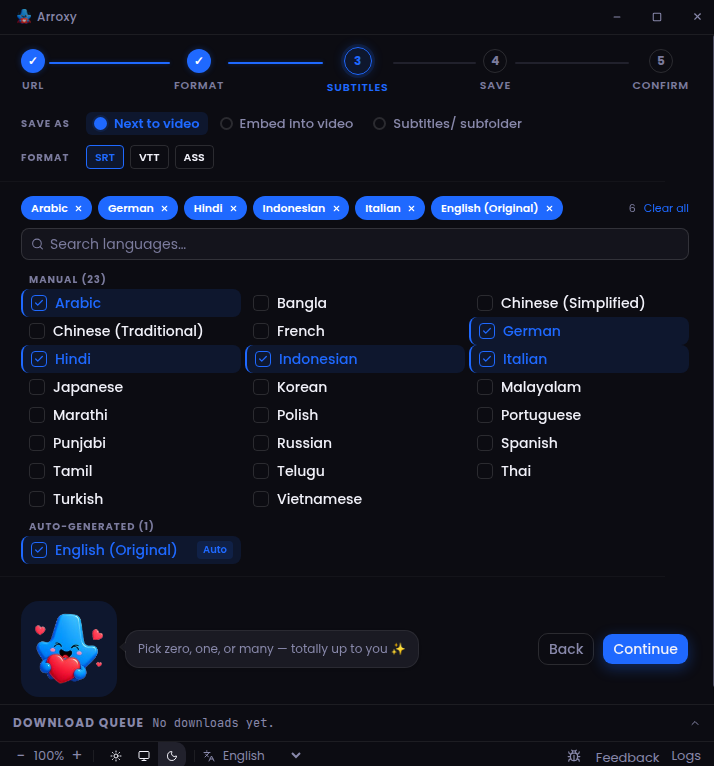
SRT, VTT သို့မဟုတ် ASS ဖြင့် လူကိုယ်တိုင် သို့မဟုတ် အလိုအလျောက် ထုတ်ပေးသော caption များ — ဗီဒီယိုနဘေးတွင် သိမ်းဆည်းပါ၊ portable .mkv ထဲ embed လုပ်ပါ၊ သို့မဟုတ် Subtitles/ folder ထဲ ထည့်ပါ။
sponsor segment, intro, outro, self-promo နှင့် အခြားများကို ကျော်ပါ သို့မဟုတ် အမှတ်အသားပြုပါ — FFmpeg ဖြင့် ဖြတ်ပါ သို့မဟုတ် community SponsorBlock database မှတဆင့် chapter များ ထည့်ပါ။ category တစ်ခုစီအတွက် သင့်ရွေးချယ်မှု။
မည်သည့်နေရာတွင်မဆို YouTube link ကူးပြီး ပြန်လှည့်လာသည့်အခါ Arroxy ချက်ချင်း ရှာဖွေသည် — အတည်ပြုချက် prompt တစ်ခုဖြင့် သင် ထိန်းချုပ်ထားသည်။ Advanced settings တွင် ဖွင့်ပါ သို့မဟုတ် ပိတ်ပါ။
ကူးထည့်သော YouTube link များမှ tracking parameter များ (si, pp, feature, utm_*, fbclid, gclid နှင့် အခြားများ) အလိုအလျောက် ဖယ်ရှားပြီး youtube.com/redirect wrapper များ ဖြည်ဖြေးသည် — URL field တွင် canonical link ကိုသာ ပြသသည်။
Window ပိတ်လိုက်သောအခါ Arroxy သည် system tray ထဲ ဝင်သည်။ ဒေါင်းလုဒ်များ နောက်ကွယ်တွင် ဆက်လုပ်သည် — tray icon နှိပ်ပြီး window ပြန်ဖွင့်ပါ၊ သို့မဟုတ် tray menu မှ ထွက်ပါ။
ခေါင်းစဉ်၊ upload ရက်စွဲ၊ အနုပညာရှင်၊ ဖော်ပြချက်၊ cover art နှင့် chapter marker များကို ဖိုင်ထဲ တိုက်ရိုက် ရေးသွင်းသည် — sidecar ဖိုင်မရှိ၊ manual tagging မလိုအပ်။
YouTube အပြင်၊ Arroxy က yt-dlp ထောက်ပံ့သည့် ဆိုက် 2000+ (၂၀၂၆ မေလ အထိ) မှ ဆွဲချသည် — Vimeo၊ Twitch၊ Twitter/X၊ TikTok၊ SoundCloud၊ Bandcamp၊ Bilibili၊ BBC iPlayer၊ archive.org နှင့် အခြားများစွာ။ အသံသာနှင့် စာတန်းထိုးများသည် YouTube ၌သာမက နေရာတိုင်းတွင် အလုပ်လုပ်သည်။
Arroxy သည် community ၏ SponsorBlock database ကို ဒေါင်းလုဒ် pipeline ထဲသို့ တိုက်ရိုက် ပေါင်းစပ်သည်။ sponsor segment, intro, outro, self-promotion နှင့် interaction reminder များကို ဖိုင်မှ ဖြတ်ထုတ်နိုင်သည် သို့မဟုတ် chapter များအဖြစ် အမှတ်အသားပြုနိုင်သည် — category တစ်ခုစီအတွက် ဒေါင်းလုဒ်တစ်ခုစီ၌ သတ်မှတ်နိုင်သည်။ browser extension ထပ်ဆောင်း မလိုအပ်ဘဲ post-processing အဆင့်လည်း မရှိဘဲ ပြင်ပ server သို့ ပြန်လည် upload မလုပ်ရပါ။
အချို့မီဒီယာများသည် လော့ဂ်အင်ဝင်ထားသော session လိုအပ်သည် — အသက်ကန့်သတ်ချက်ပါ ဗီဒီယိုများ၊ အဖွဲ့ဝင်သာ ကြည့်ရှုနိုင်သော မီဒီယာ၊ ဒေသပိတ်ဆို့ထားသော upload များ။ Arroxy သည် Advanced settings မှ cookies.txt တင်သွင်းမှုကို ထောက်ပံ့ပြီး (ဖိုင် သို့မဟုတ် browser မှ တိုက်ရိုက် export) ပုံသေအနေဖြင့် ပိတ်ထားသည်။ session သည် သင်ပေးသော ဖိုင်ထဲ၌သာ ဒေသတွင်း ရှိနေသည်; ပြင်ပ server သို့ မည်သည့်အရာမှ မပေးပို့ပါ။ yt-dlp ၏ ကိုယ်ပိုင် လမ်းညွှန်ချက်အတိုင်း automation အတွက် မိမိ၏ အဓိကအကောင့်ကို မသုံးဘဲ throwaway account တစ်ခု သုံးပါ။
အခမဲ့ ဒေါင်းလုဒ်လုပ်ပါ။ အကောင့်မလို၊ ကြော်ငြာမရှိ၊ ကြိုးများမရှိ။
YouTube downloader အများစုသည် နောက်ဆုံးတွင် သင့်ကွတ်ကီးများကို တောင်းသည်။ Arroxy သည် ဘယ်တော့မှ တောင်းမည်မဟုတ်ပါ။
Google account မလိုအပ်။ သက်တမ်းကုန်သော session မရှိ။ သင့် account ကို flag ဖြစ်မည့် အန္တရာယ် သုညရှိသည်။
Arroxy သည် မည်သည့် browser မဆို တောင်းသော token တူညီသည်ကို တောင်းသည်။ ထုတ်ယူသည့်အရာ မရှိ၊ သိမ်းဆည်းသည့်အရာ မရှိ။
OpenPanel မှတဆင့် anonymous telemetry — random per-install ID သည် launches, versions, OS နှင့် crashes ကိုရေတွက်ရန်ကူညီသည်; URLs, titles, file paths, account info, fingerprinting သို့မဟုတ် personal data မရှိပါ။ သင့် downloads, history နှင့် files များသည် သင့်စက်ကို ဘယ်တော့မှ မထွက်ပါ။
MIT လိုင်စင်။ premium tier မရှိ၊ feature ကန့်သတ်မှု မရှိ၊ banner ကြော်ငြာ မရှိ၊ dark pattern မရှိ။ pipeline တစ်ခုလုံးသည် yt-dlp + ffmpeg မှတဆင့် ဒေသတွင်း အလုပ်လုပ်သည်။
Arroxy is MIT-licensed and every line of source is on GitHub. The Windows and macOS builds are not code-signed — Apple Developer ID and Windows EV certificates cost hundreds of dollars per year, which an indie open-source project pays out of pocket. On first launch Windows SmartScreen and macOS Gatekeeper warn that the publisher is unknown. That warning means your OS doesn't recognize the publisher — it does not mean Arroxy is malware.
Every line is public on GitHub. You can audit the code, file an issue, or build it from source instead of using the prebuilt binary.
Each release ships a SHA256SUMS file. Match your download against the listed hash with sha256sum (Linux/macOS) or Get-FileHash (Windows PowerShell).
Upload the installer to VirusTotal and review the report from 70+ antivirus engines. Unsigned indie installers occasionally trigger heuristics — that's signature-based, not detection of actual malware.
yt-dlp သည် ဆိုက်ထောင်ပေါင်းများစွာကို ထောက်ပံ့သော လုပ်ဆောင်ချက်ပြည့်စုံသည့် CLI audio/video downloader တစ်ခုဖြစ်သည်။ ၎င်းသည် youtube-dl ၏ fork တစ်ခုဖြစ်ပြီး နောက်ထပ်လုပ်ဆောင်ချက်များနှင့် ပြင်ဆင်ချက်များ ပါဝင်သည်။
FFmpeg သည် multimedia framework ထိပ်တန်းဖြစ်ပြီး လူသားများနှင့် စက်များ ဖန်တီးထားသော နီးပါးအားလုံးကို decode, encode, transcode, mux, demux, stream, filter နှင့် play လုပ်နိုင်သည်။
SponsorBlock သည် YouTube ဗီဒီယိုများ၏ sponsor segment, intro, outro, self-promotion နှင့် အခြား non-content အပိုင်းများကို ကျော်နိုင်ရန် crowdsource လုပ်ထားသော browser extension နှင့် database တစ်ခုဖြစ်သည်။
Arroxy's May 2026 update: Winget delivery, auto-updater fixes, tray-mode polish, the Astro landing page, and a 30-app comparison post.
Read more →Compare 30+ desktop YouTube downloader GUIs in 2026: yt-dlp apps, free vs paid tools, open-source options, and where Arroxy fits.
Read more →တိုက်ရိုက် ဒေါင်းလုဒ် သို့မဟုတ် မည်သည့် package manager မဆို — ထုတ်ပြန်မှုတိုင်း အလိုအလျောက် အပ်ဒိတ်လုပ်သည်။
Windows 10/11 အတွက် အကြံပြုသည်။ စနစ်နှင့်အတူ အလိုအလျောက် အပ်ဒိတ်လုပ်သည်။
Scoop bucket မှတဆင့် portable တပ်ဆင်မှု။ admin အခွင့်ထူး မလိုအပ်။
Cask tap လုပ်ပြီး ညွှန်ကြားချက်တစ်ခုဖြင့် တပ်ဆင်ပါ။ Universal binary (Intel + Apple Silicon)။
Sandboxed တပ်ဆင်မှု။ Releases မှ .flatpak bundle ကို ဒေါင်းလုဒ်လုပ်ပြီး ညွှန်ကြားချက်တစ်ခုဖြင့် တပ်ဆင်ပါ။ Flathub setup မလိုအပ်ပါ။
NSIS installer, portable .exe, .dmg, .AppImage သို့မဟုတ် .flatpak — GitHub Releases မှ တိုက်ရိုက်။
Releases ဖွင့်ပါ →Arroxy ဖြင့် ဒေါင်းလုဒ်လုပ်နေသော လူထောင်ပေါင်းများစွာနှင့် ပူးပေါင်းပါ။ တစ်ချက်နှိပ်ပြီး ကျန်အရာများ အလိုလို အလုပ်လုပ်သည်။